Skip to content
Fininvo HRMS

Fininvo HRMS app · Android and iOS

HRMS mobile app for attendance, leave and payslips.

The Fininvo HRMS app puts the working day in every employee's pocket. Punch in with location, apply for leave, download payslips and Form 16, declare tax-saving investments and raise questions to HR, on the same records your HR team runs on the web.

Free to download One login with the web portal Works offline for punches

Fininvo HRMS appCheck in

What the app does

Everything an employee asks HR for, on the phone.

Twelve things employees use every week, built into one app. Each one writes to the same employee record in Fininvo HRMS, so nothing has to be copied across later.

Attendance punch with location

Check in and check out from the phone. Each punch carries the location the phone reports at that moment, so HR sees where the day started and ended.

  • Location read at the moment of the punch
  • Mock-location apps are detected and the punch is refused
  • Rooted or jailbroken phones cannot punch in
Offline punches that sync later

If the network drops, the punch is stored on the phone with its time and location and sent to Fininvo as soon as the connection returns.

  • Punch saved on the device first
  • Unsynced count shown in the app
  • Synced automatically when back online

Leave in a few taps

See your balance for every leave type your company uses, apply for leave, follow the approval and cancel a request you no longer need.

  • Balances by leave type
  • Apply and cancel
  • Clear messages when a balance is too low

Payslips as PDF

Open each payslip your employer has published, read the earnings and deductions, and download the PDF to keep or share.

  • Monthly payslip list
  • Earnings and deductions breakdown
  • PDF download to the phone

Form 16 download

Pick the financial year and download your Form 16 once your employer has issued it, ready for your income tax return.

  • Listed by financial year
  • Saved straight to the phone

Tax declarations with proofs

Choose the old or new regime and declare investments step by step: section 80C, 80D, HRA and other income, then review before you submit.

  • Regime choice
  • Guided steps for each section
  • Upload proofs from the camera or a file

Shifts and shift swaps

See the shifts you are rostered on and ask a colleague to swap a shift with you, without a chain of messages.

  • Your roster on the phone
  • Swap requests for a chosen date

Attendance regularisation

Forgot to punch or punched from the wrong place? Raise a regularisation request with the correct times and a reason for your manager.

  • Correct a missed or wrong punch
  • Reason sent with the request

Ask HR

Raise a ticket to your HR team and follow it to a reply, or search the knowledge articles your company has published first.

  • Tickets with status
  • Knowledge base search

Documents and letters

Upload documents HR asks for and open the letters HR issues to you, all kept against your employee record.

  • Upload from the phone
  • Letters in one place

Profile, team and holidays

Update your profile details and photo, look up a colleague in the team directory, check the holiday calendar and read company announcements.

  • Editable profile and photo
  • Team directory
  • Holiday list and announcements

App lock

Turn on app lock and the app asks for your fingerprint, face or device passcode after it has been idle, so a borrowed phone does not open your payslips.

  • Off by default, your choice
  • Uses the phone’s own biometrics

Attendance you can trust

A punch that records where and when.

Mobile attendance only helps HR if the punch is honest. The Fininvo HRMS app reads the phone's location at the moment of the punch, refuses a punch when a mock-location app is running, and will not punch in from a rooted or jailbroken phone. HR sees the location next to the time instead of taking the punch on trust.

Field teams lose signal. When that happens the punch is kept on the phone with its original time and location and is sent automatically once the network is back, so a site visit in a basement does not turn into an absent day.

  • Missed a punch? Raise a regularisation request for your manager.
  • Attendance status is worked out from your shift, so late marks follow your company's rules.
How attendance works in Fininvo HRMS
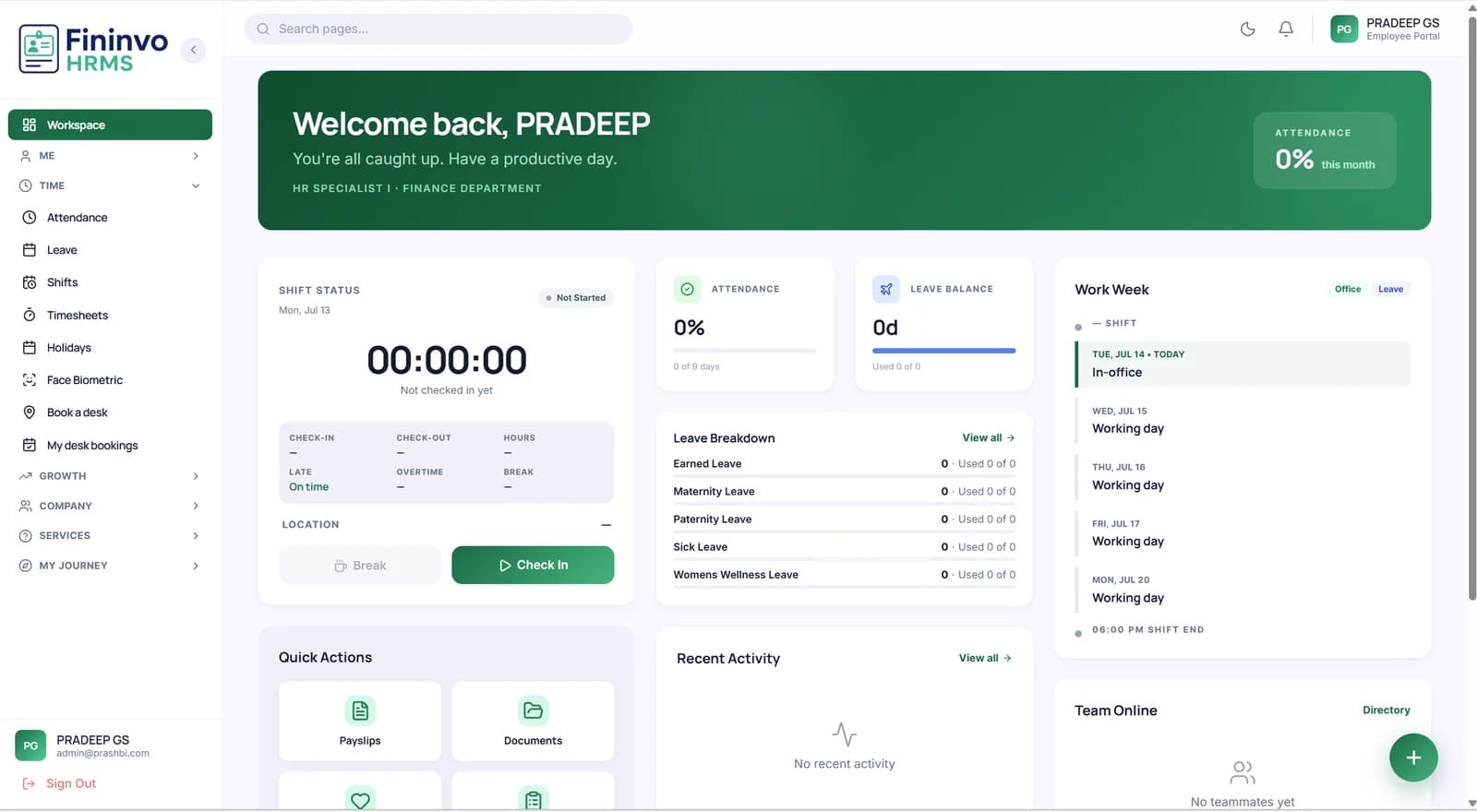
Fininvo HRMS employee workspace on the web with shift status, check-in button, leave balances and work week
The same day on the web employee portal: shift status, check in, leave balances.

Pay and tax

Payslips, Form 16 and tax proofs.

Payslip questions are the most common message an HR team gets. In the app, employees open each published payslip, see the earnings and deductions line by line and download the PDF when a bank or landlord asks for one.

At year end the same screen gives them Form 16 for each financial year. During the declaration window they choose the old or new tax regime and fill a guided declaration for section 80C, 80D, HRA and other income, uploading each proof with the phone camera instead of emailing scans to payroll.

See Fininvo Payroll
  1. PAYSLIP

    Open and download

    Every published month, with a PDF you can save or share.

  2. FORM 16

    By financial year

    Downloaded to the phone once your employer issues it.

  3. REGIME

    Old or new

    Pick the regime for the year before you declare.

  4. PROOFS

    Camera or file

    Attach each proof to the section it supports.

Getting started

From install to first punch.

Employees do not buy anything. Their company runs Fininvo HRMS and the app is how its people reach their own records.

  1. STEP 1

    Your company runs Fininvo HRMS

    The app is the employee side of Fininvo HRMS. Your HR team adds you as an employee in their workspace.

  2. STEP 2

    Install the app

    Download Fininvo HRMS free from the App Store or Google Play.

  3. STEP 3

    Sign in

    Use the employee login your HR team set up for you. The same login works on the web portal.

  4. STEP 4

    Allow location for punches

    The app asks for location only for attendance. You can review every permission in the phone settings.

For HR teams

Fewer requests in your inbox.

Every leave request, regularisation and shift swap raised in the app lands with the managers who approve it in Fininvo HRMS, and every Ask HR ticket reaches your HR team's helpdesk. Nothing arrives by chat or email, so there is one trail for every decision.

The app is the mobile half of employee self service. The full picture of what employees can do on the web portal and the app together, and how HR controls it, is on the employee self service page.

Employee self service in Fininvo HRMS Leave management

Fininvo HRMS

People, attendance & leave

14 days free, full access

Try every HRMS module free for 14 days. Paid plans start after the trial.

Questions about the HRMS app.

Is the Fininvo HRMS app free to download?

Yes. The app is free on the App Store and Google Play. It works for employees of companies that use Fininvo HRMS; the company pays for its HRMS plan, not the employee.

Can I punch attendance without an internet connection?

Yes. If the network is not available, the app saves the punch with its time and location on the phone and sends it to Fininvo when the connection returns.

Why does the app need my location?

Location is read when you punch in or out, so the punch records where it was made. The app refuses a punch when it detects a mock-location app.

Can I download my payslip and Form 16 from the app?

Yes. Payslips your employer has published can be opened and downloaded as PDF, and Form 16 can be downloaded for each financial year once it has been issued.

Can I submit tax declarations and investment proofs on the phone?

Yes. Choose your tax regime, fill the declaration step by step (80C, 80D, HRA and other income) and upload proofs from the camera or a file.

Is the HRMS app the same as the web employee portal?

They share one employee account and the same records. A leave applied in the app shows on the web portal and the other way round.

Is this the same app as Fininvo ERP or Fininvo Jobs?

No. Fininvo HRMS, Fininvo ERP and Fininvo Jobs are three separate apps with separate store listings. This page covers the HRMS app for employees.

Get the app

Fininvo HRMS, on Android and iOS.