A complete job page
Title, description, requirements, skills, work mode, experience range, pay range and how it is shown, location, openings, urgency and benefits.
- Show the pay range, mark it negotiable or hide it
- Remote, hybrid or on-site

Fininvo Recruit · Free plan
Post a job on the Fininvo Recruit free plan. The role is listed on Fininvo Jobs, candidates apply there, and every application lands on your applicant tracking board, ready to review.
Get started, 1 live job, basic applicant tracking
Why post here
Most free job posting sites stop at the listing. In Fininvo Recruit the post is the first step of a hiring workflow your team runs in one place.
Title, description, requirements, skills, work mode, experience range, pay range and how it is shown, location, openings, urgency and benefits.
Ask what you would ask on the first phone call, at the moment the candidate applies.
Start from a Fininvo preset or save your own template, so the next opening for the same role takes minutes.
Every employer account is reviewed before its jobs go live, so candidates see roles from real companies.
Each job is checked against our content policy when you publish. Clear violations are refused with a reason; borderline wording is flagged for review.
When a role needs more reach, buy a promotion credit for one job: a Featured band, an Urgent badge, a homepage slot or a category highlight, each for 7 days.
Where candidates see it
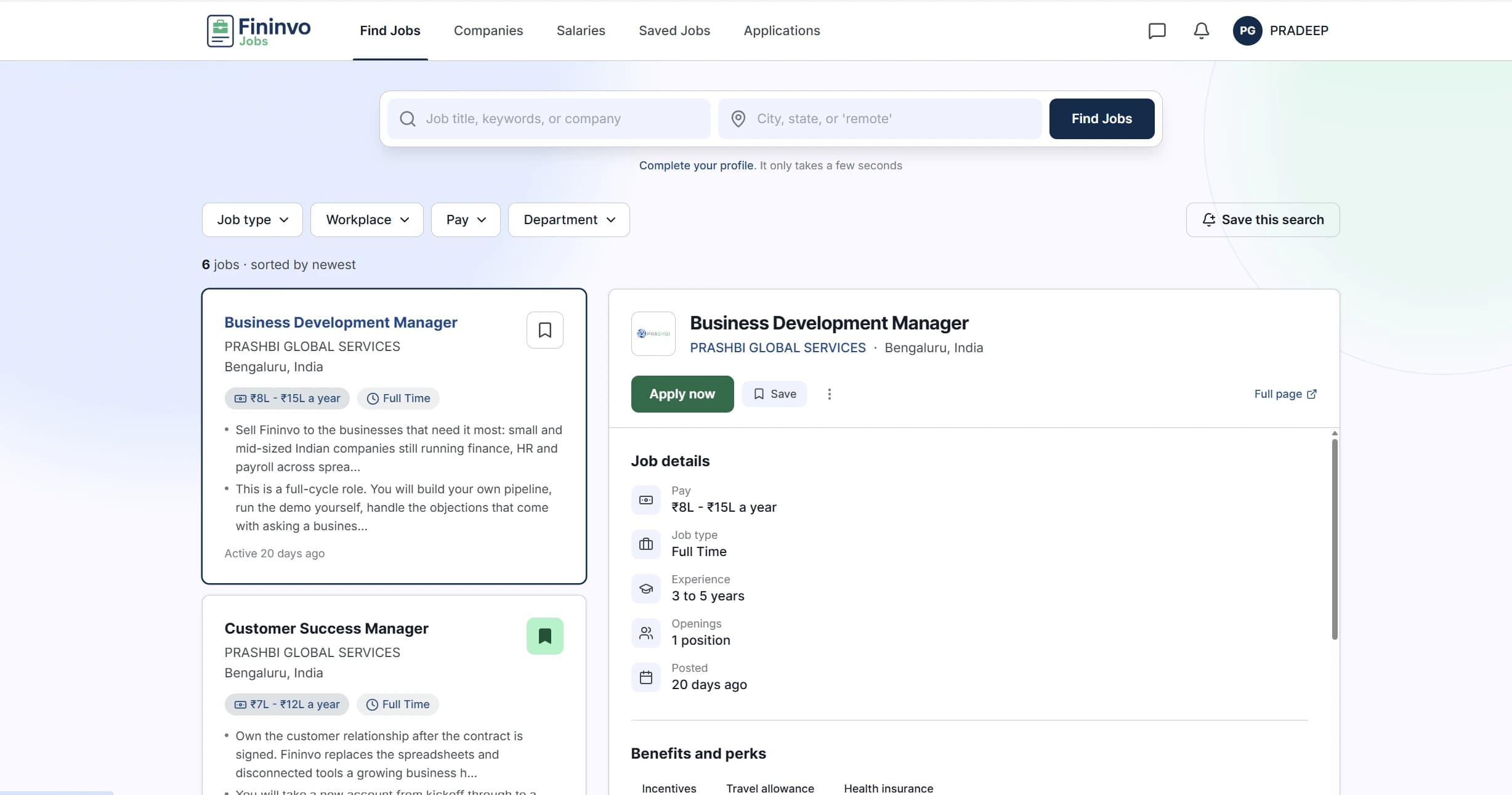
When you publish, the job is listed on Fininvo Jobs, the job board we run for candidates. Candidates search by title, skill and location, filter by job type, workplace and pay, save jobs and set alerts. Each role has its own job page, and your company has a profile page with your logo, cover image, photos, benefits and the other roles you have open.
A candidate applies with a Fininvo Jobs profile and answers your screening questions. The application is not an email in an inbox: it arrives on the board for that job in Recruit, with the resume and the answers attached. Candidates get a notification when you move them to a new stage or schedule an interview, so you do not have to write a status email for every step.
Open Fininvo Jobs to see how listings look to a candidate.
Step by step
Sign up with your work email or Google. New accounts start with a trial of a paid plan; when it ends you stay on the free plan.
Submit your company domain, GSTIN or a document. You can draft jobs while the review is pending.
Start from a preset or a blank job, add screening questions and preview the job page before it goes live.
The job goes live on Fininvo Jobs for 30 days. Applications appear on the job board in Recruit as they arrive.
Free plan and paid plans
Every plan uses the same job page, screening questions, applicant board and Fininvo Jobs listing. Paid plans raise the limits and add team and reporting features. Exact numbers per plan are on the pricing page and come from the same plan list as the card above.
| Area | Free plan | Paid plans |
|---|---|---|
| Live jobs | A small fixed number | More live jobs per plan; custom limits on Enterprise |
| Applicant tracking | Included: stage board, ratings, notes | Included, across more live jobs |
| Team seats | The account owner | Several seats, with per-seat permissions on higher plans |
| Talent pool and outreach | A small pool and a daily outreach allowance | Larger pool and higher daily outreach |
| Analytics | Views and applies | Funnel and source analytics; advanced analytics and branded reports on higher plans |
| Company page | Logo and cover image | Company video and careers page customisation on higher plans |
Plan limits are enforced at the moment you act. If you try to publish a job above your live job limit, the publish is refused with a message; jobs already live are never taken down. Closing a job, or letting it expire, frees the slot immediately.
Before you post
A free listing only helps if the right people apply. Candidates on job boards decide in seconds, so lead with the role title people actually search for: "Accounts Executive" finds more candidates than an internal grade name. Put the location and work mode in the fields provided rather than in the description, so the job shows up when candidates filter.
Pay matters more than any other field. Fininvo Recruit lets you show a range, mark pay as competitive or negotiable, or hide it, and you choose whether the figure is per hour, day, week, month or year. Listings that show a range tend to draw applicants who have already accepted it, which saves a round of calls.
Keep the description to what the person will do in the first six months and the skills you will actually test. Then use screening questions for the hard requirements, such as a licence, a notice period or a willingness to relocate, instead of writing them in capitals in the description. A knockout question set to flag keeps the decision with you; set to reject, it removes the application automatically.
Finally, fill in your company page. Candidates click through to see who you are, and a page with a logo, photos and benefits looks like an employer worth applying to. If you are weighing Recruit against other job sites, see how Fininvo Recruit compares.
Yes. Recruit has a free plan with no monthly price. It includes a set number of live jobs, applicant tracking and a company page. The current limits are read from our plan list and shown on this page and on the Recruit pricing page. Paid plans add more live jobs, team seats and outreach.
Published roles are listed on Fininvo Jobs, our job board for candidates, where they can search, read the full job page and apply. Applications arrive in your Recruit account, on the board for that job.
To keep fake jobs off the board. A new employer account is reviewed first, and you can submit a company domain, GSTIN or a document as proof. Until the account is verified you can write and save jobs as drafts, but publishing is blocked.
A published job stays live for 30 days and then expires. You can close it earlier when the role is filled, which frees the slot for your next role, and you can publish it again later.
Yes. Add text, yes or no, and multiple choice questions to the job. A question can be marked as a knockout with the answer that passes; a failed knockout either flags the application for you to decide or rejects it, depending on how you set the question.
No payment is taken to open an employer account or to stay on the free plan. You pay only if you choose a paid plan or buy promotion credits for a job.
Publishing a new job above your live job limit is refused with a message, and jobs already live stay live. Close a job to free a slot, or move to a paid plan from the Billing page in Recruit.