A stage board for every job
Applied, Under review, Interview, Offer, Hired and Rejected. Move a candidate forward from the card, or select several and move them together.
- One board per job
- Bulk stage changes
Fininvo Recruit · ATS
Every job gets a stage board. Every candidate carries their resume, screening answers, ratings, notes, interviews and messages. Your team sees the same picture, from the first application to the hire.
What the ATS does
Built for employers who hire a few people a month as much as for teams hiring every week. No setup project: post a job and the board is there.
Applied, Under review, Interview, Offer, Hired and Rejected. Move a candidate forward from the card, or select several and move them together.
Rate each candidate and leave notes your colleagues can read, so the reason behind a decision stays with the candidate.
The answers to your screening questions sit on the application. Failed knockout answers are flagged, or rejected if you set the question that way.
Message a candidate from their application once they are past the first review. The conversation stays in Recruit, not in personal inboxes.
Save strong candidates you could not hire this time into your private talent pool and reach out when the next role opens.
Search candidates who chose to be discoverable on Fininvo Jobs by name, skill, city and experience, or prefill the search from one of your live jobs.
Download shortlisted resumes for a job as one ZIP, within a daily export allowance that depends on your plan.
Invite recruiters and hiring managers, change roles, deactivate leavers and, on higher plans, set permissions per seat.
See the funnel from view to apply to hire, where applicants come from and how your recruiters are doing. Export reports for review meetings.
Inside the console
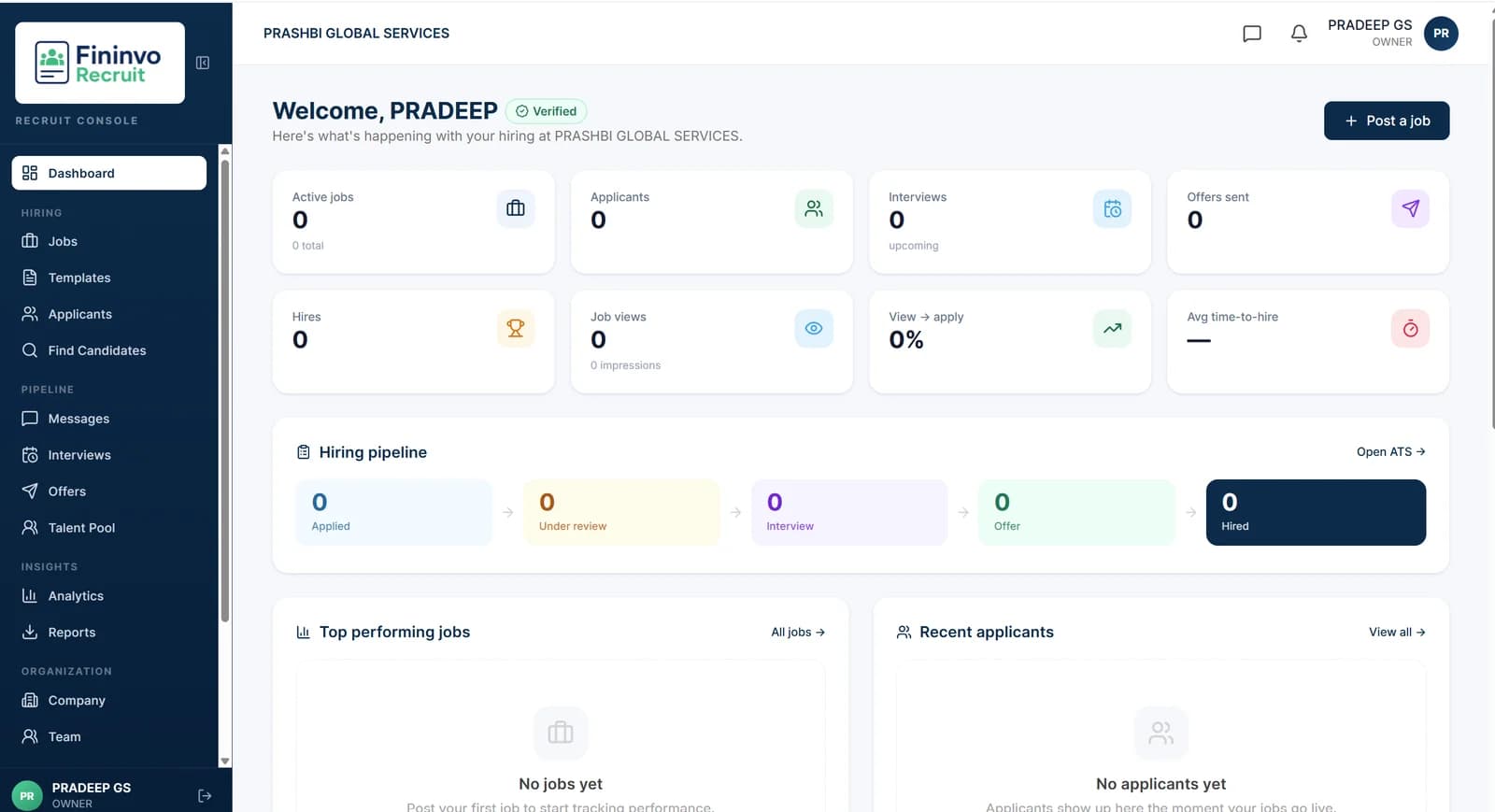
The Recruit dashboard opens on the numbers that tell you whether hiring is moving: active jobs, applicants, upcoming interviews, offers, hires, job views and the view-to-apply rate. Below them the pipeline shows how many candidates sit at each stage across all your jobs, with a link straight into the ATS.
Top performing jobs and recent applicants sit side by side, so a recruiter starting the day knows which roles need attention and which candidates are waiting for a first look. Notifications in the top bar tell you when a candidate applies or replies.
Privacy by stage
| Stage | Contact details | Messaging | Resume export |
|---|---|---|---|
| Applied | Masked | Not yet | Not included in bulk export |
| Under review | Masked, reveal is recorded | Available for registered candidates | Included |
| Interview | Shown | Available | Included |
| Offer | Shown | Available | Included |
| Hired | Shown | Available | Included |
Job applications carry personal data. Masking phone numbers and email addresses until a candidate is genuinely in your process, and recording every early reveal, keeps that data with the people who need it and makes it harder to harvest a candidate list from a job post.
Choosing an ATS
For a small or mid-sized employer the right ATS is the one your team will actually use. Start with the job board connection: if postings and applications live in two systems, someone ends up copying data. In Fininvo Recruit the job you publish is listed on Fininvo Jobs and every application arrives on that job's board, so there is nothing to import.
Next, look at how the tool handles the second half of hiring. Interviews should be scheduled against the candidate, with reminders and feedback captured in the same place; see interview scheduling in Recruit. Candidate messages should stay in the system so a colleague can pick up a conversation. And reports should come from the same records, not from a separate spreadsheet.
Finally, check the cost of growing. An ATS that charges per recruiter makes it expensive to involve hiring managers. Recruit plans are set by live jobs, seats and outreach, and the free plan lets you run real hiring before you pay anything. Compare plans on the Recruit pricing page, or see how Recruit compares with other hiring tools.
Moving from spreadsheets
Many teams first try an ATS after a role goes badly: a good candidate who never heard back, two managers interviewing the same person, or a shortlist nobody can find. The switch does not need a migration. Publish your open roles in Recruit, and new applications arrive on the boards from that day. Keep the old spreadsheet for the roles already in progress and let it run out.
Agree three habits with the team on day one. Every candidate gets a stage, so nobody sits in Applied for weeks. Every interview gets feedback in Recruit, not in chat. And every rejection is a stage change, which also tells candidates who applied through Fininvo Jobs that a decision was made. Within a few weeks the dashboard and the funnel report show where your hiring actually slows down, which is the conversation an ATS is really for.
An applicant tracking system (ATS) keeps every application for a job in one place and moves each candidate through stages, from applied to hired or rejected, with the notes, ratings and messages that explain each decision. It replaces resumes in an inbox and status updates in a spreadsheet.
Applied, Under review, Interview, Offer, Hired and Rejected. Each job has its own board with these columns, and you move a candidate by changing the stage on the card or in bulk for several candidates at once.
Yes. The stage board, screening answers, ratings and notes are part of every Recruit plan, including the free plan. Paid plans add more live jobs, team seats, a larger talent pool, more daily outreach and deeper analytics.
Contact details are masked while a candidate is at Applied or Under review and shown once you move them to Interview or later. If you need them earlier you can reveal them, and that reveal is recorded. This keeps personal data away from anyone who only browses applications.
Yes, on paid plans. Invite team members by email, give each a role, and on higher plans set permissions per seat. Interviews can be assigned to the interviewers on your team.
Yes. Open a resume from the candidate, or download the resumes of shortlisted candidates (Under review or later) for a job as one ZIP file. Daily export limits depend on your plan.
Recruit and HRMS are separate products. Companies on Fininvo HRMS can sign in to Recruit from HRMS. The hand-over of a hired candidate into an HRMS employee record is being rolled out and is not described here as a standard feature yet.